Sticky

This blog has moved to www.dreamingincrm.com. Please update your feed Url. Thank you.

22 October 2014

Executing Quick Find from Console Application : Redux

If you have been following my blog, you might remember this (http://nycrmdev.blogspot.com.au/2014/05/executing-quickfind-using-crm-sdk.html) post about executing a quick find query from the console. It was using an undocumented message, and hence it is unsupported. I had a crack at this problem one more time, this time using Actions.

In order to return the quick find results, the custom action need to have a EntityCollection output parameter. I posted this (https://community.dynamics.com/crm/f/117/t/128534.aspx) question in CRM forums sometime back and didn't get any response.


This is not production ready code and just demonstrates how this can be done. If you would rather read the code, instead of this post please find the download link in the very bottom.

Requirements:
For the search - should be able to specify:
1.) Entity name
2.) Search term
3.) Page number
4.) Number of records to be returned

Step 1: Create a custom action

 
The body of the action is empty and doesn't contain any logic. The actual quickfind will be performed by a plugin registered post-operation of this action.

Step 2: Create the plugin

using Microsoft.Xrm.Sdk;
using Microsoft.Xrm.Sdk.Query;
using System;
using System.Linq;
using System.Xml.Linq;
using Contract = System.Diagnostics.Contracts.Contract;

namespace QuickFindAction.Plugins
{
    public class QuickFindPlugin : IPlugin
    {
        internal IOrganizationService OrganizationService
        {
            get;

            private set;
        }

        internal IPluginExecutionContext PluginExecutionContext
        {
            get;

            private set;
        }

        internal ITracingService TracingService
        {
            get;

            private set;
        }

        public void Execute(IServiceProvider serviceProvider)
        {
            Contract.Assert(serviceProvider != null, "serviceProvider is null");
            PluginExecutionContext =
                (IPluginExecutionContext)serviceProvider.GetService(typeof(IPluginExecutionContext));
            TracingService = (ITracingService)serviceProvider.GetService(typeof(ITracingService));
            Contract.Assert(TracingService != null, "TracingService is null");

            try
            {
                var factory =
                    (IOrganizationServiceFactory) serviceProvider.GetService(typeof (IOrganizationServiceFactory));

                OrganizationService = factory.CreateOrganizationService(this.PluginExecutionContext.UserId);

                Contract.Assert(PluginExecutionContext.InputParameters.Contains("SearchTextInput"), "No SearchTextInput property");
                Contract.Assert(
                    !string.IsNullOrEmpty(PluginExecutionContext.InputParameters["SearchTextInput"].ToString()), "SearchTextInput is null or empty");
                Contract.Assert(PluginExecutionContext.InputParameters.Contains("EntityNameInput"), "No EntityNameInput property");

                string searchText = PluginExecutionContext.InputParameters["SearchTextInput"].ToString(),
                       searchEntity = PluginExecutionContext.InputParameters["EntityNameInput"].ToString();

                var savedViewQuery = string.Format(
                    @"<fetch version=""1.0"" output-format=""xml-platform"" mapping=""logical"" distinct=""false"">
                      <entity name=""savedquery"">
                        <attribute name=""fetchxml"" />
                        <filter type=""and"">
                          <condition attribute=""statecode"" operator=""eq"" value=""0"" />
                          <condition attribute=""isquickfindquery"" operator=""eq"" value=""1"" />
                          <condition attribute=""isdefault"" operator=""eq"" value=""1"" />
                          <condition attribute=""name"" operator=""like"" value=""%{0}%"" />
                        </filter>
                      </entity>
                    </fetch>", searchEntity);

                var quickFindFetchXml =
                    OrganizationService.RetrieveMultiple(new FetchExpression(savedViewQuery)).Entities[0].GetAttributeValue<string>("fetchxml");
                    TracingService.Trace("FetchXml read from SavedView");
                    var entityFetchXml = XElement.Parse(string.Format(quickFindFetchXml, string.Format("%{0}%", searchText)));

                if (PluginExecutionContext.InputParameters["Page"] != null)
                {
                    entityFetchXml.SetAttributeValue("page", PluginExecutionContext.InputParameters["Page"]);
                }
                if (PluginExecutionContext.InputParameters["Count"] != null)
                {
                    entityFetchXml.SetAttributeValue("count", PluginExecutionContext.InputParameters["Count"]);
                }

                entityFetchXml.Elements().Elements("filter").Elements().ToList().ForEach(x => {
                                                                                                  if (
                                                                                                      x.Attribute(
                                                                                                          "attribute")
                                                                                                          .Value
                                                                                                          .EndsWith("id"))
                                                                                                  {
                                                                                                      x.SetAttributeValue("attribute",x.Attribute("attribute").Value+"name");
                                                                                                  } });
                PluginExecutionContext.OutputParameters["FetchXml"] = entityFetchXml.ToString();

                var results = OrganizationService.RetrieveMultiple(new FetchExpression(entityFetchXml.ToString()));
                PluginExecutionContext.OutputParameters["SearchResultsOutput"] = new EntityCollection(results.Entities.ToList());
            }
            catch (Exception e)
            {
                TracingService.Trace(e.StackTrace);
                PluginExecutionContext.OutputParameters["Exception"] = e.StackTrace;
                throw;
            }
        }
    }
}

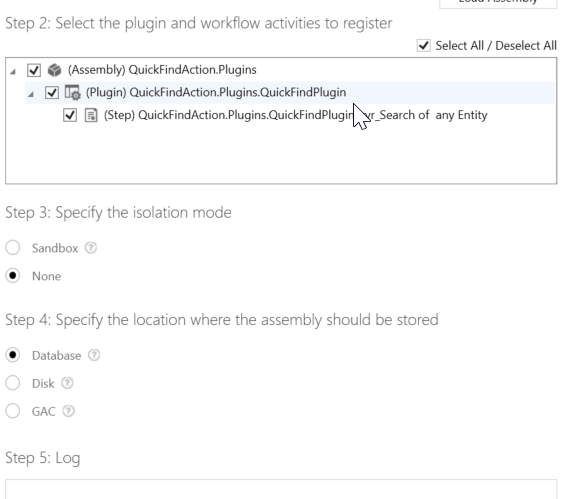
Step 3: Register the plugin


Step 4: Create the Console Application
using System;
using System.Collections.Generic;
using System.Linq;
using System.Net;
using System.Text;
using System.Threading.Tasks;
using Microsoft.Crm.Sdk.Messages;
using Microsoft.Xrm.Sdk;
using Microsoft.Xrm.Tooling.Connector;

namespace ActionsTester
{
    class Program
    {
        static void Main(string[] args)
        {
            try
            {
                var executeQuickFindRequest = new OrganizationRequest("ryr_Search");
                executeQuickFindRequest["SearchTextInput"] = "sus";
                executeQuickFindRequest["EntityNameInput"] = "contact";
                executeQuickFindRequest["Page"] = 1;
                //executeQuickFindRequest["Count"] = 1;

                var crmSvc =
                    new CrmServiceClient(new NetworkCredential("administrator", "p@ssw0rd1", "CRM"),
                                         AuthenticationType.AD, "crm1", "80", "Contoso");
                if (crmSvc.IsReady)
                {
                    crmSvc.OrganizationServiceProxy.Execute(executeQuickFindRequest);
                    OrganizationResponse response = crmSvc.OrganizationServiceProxy.Execute(executeQuickFindRequest);
                    if (response.Results.Contains("Exception") && response.Results["Exception"] != null)
                    {
                        Console.WriteLine(response.Results["Exception"]);
                        Console.WriteLine(response.Results["FetchXml"]);
                        return;
                    }
                    if (response.Results["SearchResultsOutput"] != null)
                    {
                        Console.WriteLine(response.Results["FetchXml"]);
                        var results = (EntityCollection) response.Results["SearchResultsOutput"];
                        foreach (var record in results.Entities)
                        {
                            record.Attributes.ToList().ForEach(x=> Console.WriteLine("{0}={1}",x.Key,Unwrap(x.Value)));
                            Console.WriteLine();
                        }
                    }
                }
            }
            catch (Exception e)
            {
                Console.WriteLine(e.StackTrace);
            }
        }

        private static object Unwrap(object attributeValue)
        {
            var unwrappedValue = attributeValue;
            if (attributeValue is EntityReference)
            {
                unwrappedValue = ((EntityReference) attributeValue).Name;
            }
            else
                if (attributeValue is OptionSetValue)
                {
                    unwrappedValue = ((OptionSetValue)attributeValue).Value;
                }
            else
                if (attributeValue is Money)
                {
                    unwrappedValue = ((Money)attributeValue).Value;
                }
            return unwrappedValue;
        }
    }
}

Output:
The search term is "sus" and the entity is contact

Limitations:
1.) Search term is field type agnostic (exception of a lame entity reference mapping). So if a Optionset is in the quickfind query, the search term won't work properly
2.) Assumption is made that the quick find view name has the entity name. So if entity name is contact and the quick find view doesn't have the word contact this won't work properly.
3.) Assumption is made that schema name for lookups end with id.

Problems Faced:
I was initially using strongly typed entities with a generated service context in the plugin, but had some serialisation exceptions along the way and decided to switch to query approach to get the application working. The exception was

>System.Runtime.Serialization.SerializationException: Microsoft Dynamics CRM has experienced an error. Reference number for administrators or support: #59D91113: 
System.Runtime.Serialization.SerializationException: Element 'http://schemas.microsoft.com/xrm/2011/Contracts:Entity' contains data from a type that maps to the name 'Contoso.EarlyBound.Generated:Contact'. 
The deserializer has no knowledge of any type that maps to this name. Consider changing the implementation of the ResolveName method on your DataContractResolver to return a non-null value for name 'Contact' 
and namespace 'Contoso.EarlyBound.Generated'.
>   at System.Runtime.Serialization.XmlObjectSerializerReadContext.InternalDeserialize(XmlReaderDelegator reader, String name, String ns, Type declaredType, DataContract& dataContract)
>   at System.Runtime.Serialization.XmlObjectSerializerReadContext.InternalDeserialize(XmlReaderDelegator xmlReader, Int32 id, RuntimeTypeHandle declaredTypeHandle, String name, String ns)
>   at ReadArrayOfEntityFromXml(XmlReaderDelegator , XmlObjectSerializerReadContext , XmlDictionaryString , XmlDictionaryString , CollectionDataContract )
>   at System.Runtime.Serialization.CollectionDataContract.ReadXmlValue(XmlReaderDelegator xmlReader, XmlObjectSerializerReadContext context)
>   at System.Runtime.Serialization.XmlObjectSerializerReadContext.InternalDeserialize(XmlReaderDelegator reader, String name, String ns, Type declaredType, DataContract& dataContract)
>   at System.Runtime.Serialization.XmlObjectSerializerReadContext.InternalDeserialize(XmlReaderDelegator xmlReader, Int32 id, RuntimeTypeHandle declaredTypeHandle, String name, String ns)
>   at ReadEntityCollectionFromXml(XmlReaderDelegator , XmlObjectSerializerReadContext , XmlDictionaryString[] , XmlDictionaryString[] )
>   at System.Runtime.Serialization.ClassDataContract.ReadXmlValue(XmlReaderDelegator xmlReader, XmlObjectSerializerReadContext context)
>   at System.Runtime.Serialization.XmlObjectSerializerReadContext.InternalDeserialize(XmlReaderDelegator reader, String name, String ns, Type declaredType, DataContract& dataContract)
>   at System.Runtime.Serialization.XmlObjectSerializerReadContext.InternalDeserialize(XmlReaderDelegator xmlReader, Int32 id, RuntimeTypeHandle declaredTypeHandle, String name, String ns)
>   at ReadKeyValuePairOfstringanyTypeFromXml(XmlReaderDelegator , XmlObjectSerializerReadContext , XmlDictionaryString[] , XmlDictionaryString[] )
>   at System.Runtime.Serialization.ClassDataContract.ReadXmlValue(XmlReaderDelegator xmlReader, XmlObjectSerializerReadContext context)
>   at System.Runtime.Serialization.XmlObjectSerializerReadContext.InternalDeserialize(XmlReaderDelegator reader, String name, String ns, Type declaredType, DataContract& dataContract)
>   at System.Runtime.Serialization.XmlObjectSerializerReadContext.InternalDeserialize(XmlReaderDelegator xmlReader, Int32 id, RuntimeTypeHandle declaredTypeHandle, String name, String ns)
>   at ReadParameterCollectionFromXml(XmlReaderDelegator , XmlObjectSerializerReadContext , XmlDictionaryString , XmlDictionaryString , CollectionDataContract )
>   at System.Runtime.Serialization.CollectionDataContract.ReadXmlValue(XmlReaderDelegator xmlReader, XmlObjectSerializerReadContext context)
>   at System.Runtime.Serialization.XmlObjectSerializerReadContext.InternalDeserialize(XmlReaderDelegator reader, String name, String ns, Type declaredType, DataContract& dataContract)
>   at System.Runtime.Serialization.XmlObjectSerializerReadContext.InternalDeserialize(XmlReaderDelegator xmlReader, Type declaredType, DataContract dataContract, String name, String ns)
>   at System.Runtime.Serialization.DataContractSerializer.InternalReadObject(XmlReaderDelegator xmlReader, Boolean verifyObjectName, DataContractResolver dataContractResolver)
>   at System.Runtime.Serialization.XmlObjectSerializer.ReadObjectHandleExceptions(XmlReaderDelegator reader, Boolean verifyObjectName, DataContractResolver dataContractResolver)
>   at System.Runtime.Serialization.XmlObjectSerializer.ReadObject(XmlDictionaryReader reader)
>   at Microsoft.Crm.Sandbox.SandboxUtility.DeserializeDataContract[T](Byte[] serializedDataContract, Assembly proxyTypesAssembly)
>   at Microsoft.Crm.Sandbox.SandboxExecutionContext.Merge(IExecutionContext originalContext)
>   at Microsoft.Crm.Sandbox.SandboxCodeUnit.Execute(IExecutionContext context)


Observation:
1.) I was surprised to see address1_composite on the result set even though I did not mention it in the search find query. Running the exact same query in XrmToolBox FetchXml Tester doesn't return address1_composite field.
2.) count=0 on a fetchxml somehow works and returns records if matches are found.

Improvements that can be made:
1.) Parse the attributes in quickfind fetchxml and retrieve the types of these attributes, so that the search query can be correctly mapped.
2.) Use PFE Core Library on the retrieve part
3.) Add additional types to the unwrapping code in console application (currently unwraps only entityreference, optionsetvalue and money).

Conclusion:
Actions are AWESOME. I can write a logic once and can call this from console application, workflow or javascript. Previously you would have to encapsulate this logic on a webservice, to get this kind of extensibility.

Code: http://1drv.ms/1w5GJ2b

17 October 2014

Copy Record Id of a row from Advanced Find

I have recently started using bookmarklets to improve productivity during CRM Development. There are plenty of bookmarklets that I use, and of these I quite frequently use these:
  1. Copy Record Id (http://blog.sonomapartners.com/2014/01/crm-2013-javascript-bookmark-series-part-1.html)
  2. Open Advanced Find (http://www.magnetismsolutions.com.au/blog/paulnieuwelaar/2014/07/24/crm-2013-open-advanced-find-from-anywhere-with-bookmarklet)
  3. Open Default Solution (http://www.magnetismsolutions.com.au/blog/paulnieuwelaar/2014/07/27/customize-and-publish-from-crm-2013-forms-with-bookmarklets)
Inorder to use the Copy Record Id bookmarket you'll have to be in the record form. I found this inconvinient when I was viewing the results from Advanced Find. You can bookmarklet the below script to quickly extract the primary key of the selected row in the Advanced Find resultset.

javascript:var contentFrame=document.getElementById('contentIFrame0'),isError=false;if(contentFrame){var resultFrame=contentFrame.contentWindow.document.getElementById('resultFrame');if(resultFrame&&resultFrame.contentWindow){var selectedRow=resultFrame.contentWindow.document.querySelector('.ms-crm-List-SelectedRow');if(selectedRow){window.prompt('Copy to clipboard: Ctrl+C, Enter',selectedRow.getAttribute('oid'));}
else{alert('Please select a row to get the id');}}else{isError=true;}}else{isError=true;}
if(isError){alert('Unable to locate result frame to extract rowid');}
void 0;

Here is the how it looks when you run the code on a row in the advanced find result.


I have tested this in the latest version of Firefox (33) and Chrome (38) and it works.

30 September 2014

Gotcha: Reading Multiple Files using SSIS

Using SSIS for performing data migration is lot easier than using a custom application to do the same. I recently had a opportunity to perform data migration using Cozyroc SSIS connector. Being new to Cozyroc and SSIS, I had to google a lot to find answers to my questions. The input files that need to be upserted into CRM, were split into multiple files with the same structure.

I refered this post (http://bi-polar23.blogspot.com.au/2007/08/loading-multiple-excel-files-with-ssis.html) on how to setup a foreach loop to read the excel files. I have a 64 bit version of Office 2013 installed, but to read XLSX files, you have to install Access 2010 32 bit database engine, because VS2012 is 32 bit. Installation is successful, but after that point my 64 bit Office goes into an "Activate Office" loop, even though I can run the SSIS package in VS2012. I am guessing this is becuase I have a Office365 subscription and installing 32 bit Acess 2010 confuses the activation mechanism.

So, I decided to use the Excel Source Plus component that comes with Cozyroc. Despite of properly following the instruction from the post, I found that only first file is read multiple times, which was not the behaviour I expected. After much experimentation, I found that setting the RetainSameConnection setting to false, fixes the issue and all the files are read in.

I hope this is useful to anyone doing data migration using Cozyroc.

31 August 2014

Calculated fields using Plugin

Calculated fields will eventually make its way to Dynamics CRM. In the mean time, you can use ISV products like north52 Formula Manager, to achieve this functionality. If you are a developer and would like to implement a light weight version of calculated fields, this can be done using Plugins.

First we need a configuration entity to store the fetchxml that will be used for the calculation and the entity/attribute details that will use this on the Retrieve message.
In this case, the account field exp_invoicetotal will use the fetchxml result's totalworthofinvoices. This is an aliased field. Note that we use {0}, that will be replaced by the primary key of the entity that the plugin executes on.

Here is how the plugin is registered in the Plugin Registration tool. It executes on Retrieve of account.

Now the sourcecode for the actual plugin.

using CalculateOnRetrievePlugin.Entities;
using Microsoft.Xrm.Sdk;
using Microsoft.Xrm.Sdk.Query;
using System;

namespace Experiments.Plugins
{
    public class CalculateOnRetrievePlugin : Plugin
    {
        /// <summary>
        /// Initializes a new instance of the <see cref="CalculateOnRetrievePlugin"/> class.
        /// </summary>
        public CalculateOnRetrievePlugin()
            : base(typeof(CalculateOnRetrievePlugin))
        {
            //Third Param is primary entity name
            base.RegisteredEvents.Add(new Tuple<PipelinePhase, Message, string, Action<LocalPluginContext>>(PipelinePhase.PostOperation, Message.Retrieve, "account", ExecuteCalculateOnRetrievePlugin));

            // Note : you can register for more events here if this plugin is not specific to an individual entity and message combination.
            // You may also need to update your RegisterFile.crmregister plug-in registration file to reflect any change.
        }

        /// <summary>
        /// Executes the plug-in.
        /// </summary>
        /// <param name="localContext">The <see cref="LocalPluginContext"/> which contains the
        /// <see cref="IPluginExecutionContext"/>,
        /// <see cref="IOrganizationService"/>
        /// and <see cref="ITracingService"/>
        /// </param>
        /// <remarks>
        /// For improved performance, Microsoft Dynamics CRM caches plug-in instances.
        /// The plug-in's Execute method should be written to be stateless as the constructor
        /// is not called for every invocation of the plug-in. Also, multiple system threads
        /// could execute the plug-in at the same time. All per invocation state information
        /// is stored in the context. This means that you should not use global variables in plug-ins.
        /// </remarks>
        protected void ExecuteCalculateOnRetrievePlugin(LocalPluginContext localContext)
        {
            var targetEntity = (Entity)localContext.PluginExecutionContext.OutputParameters["BusinessEntity"];

            var queryConfiguration = new QueryExpression(ExpCalculatedfieldconfiguration.Fields.SchemaName)
                {
                    ColumnSet = new ColumnSet(
                        ExpCalculatedfieldconfiguration.Fields.ExpName,
                        ExpCalculatedfieldconfiguration.Fields.ExpResultField,
                        ExpCalculatedfieldconfiguration.Fields.ExpQuery,
                        ExpCalculatedfieldconfiguration.Fields.ExpFieldName,
                        ExpCalculatedfieldconfiguration.Fields.ExpIsAliasedField)
                };
            queryConfiguration.Criteria.AddCondition(new ConditionExpression(
                ExpCalculatedfieldconfiguration.Fields.ExpName, ConditionOperator.Equal,
                localContext.PluginExecutionContext.PrimaryEntityName));
            queryConfiguration.Criteria.AddCondition(new ConditionExpression(
                ExpCalculatedfieldconfiguration.Fields.Statecode, ConditionOperator.Equal, 0));
            var calcConfigRecords = localContext.OrganizationService.RetrieveMultiple(queryConfiguration).Entities;

            foreach (var calcConfigRecord in calcConfigRecords)
            {
                var isAliased = (bool)calcConfigRecord[ExpCalculatedfieldconfiguration.Fields.ExpIsAliasedField];
                var calculatedQueryResults = localContext.OrganizationService.RetrieveMultiple(
                    new FetchExpression(
                        string.Format(calcConfigRecord[
                        ExpCalculatedfieldconfiguration.Fields.ExpQuery].ToString(),
                        localContext.PluginExecutionContext.PrimaryEntityId)
                        )).Entities;

                foreach (var calculatedQueryResult in calculatedQueryResults)
                {
                    var targetFieldName =
                        calcConfigRecord[ExpCalculatedfieldconfiguration.Fields.ExpFieldName].ToString();
                    var resultFieldName =
                        calcConfigRecord[ExpCalculatedfieldconfiguration.Fields.ExpResultField].ToString();
                    var fieldValue = calculatedQueryResult[resultFieldName] as AliasedValue;
                    if (fieldValue != null)
                    {
                        targetEntity[targetFieldName] = ExtractString(fieldValue.Value);
                    }
                    else
                    {
                        targetEntity[targetFieldName] = 
                            ExtractString(calculatedQueryResult[resultFieldName]);
                    }
                }
            }
        }

        private string ExtractString(object attributeValue)
        {
            var attributeType = attributeValue.GetType(); 
            var result = string.Empty;
            if (attributeType == typeof (EntityReference))
            {
                result = ((EntityReference) attributeValue).Name;
            }
            else if (attributeType == typeof(OptionSetValue))
            {
                result = ((OptionSetValue)attributeValue).Value.ToString();
            }
            else if (attributeType == typeof(Money))
            {
                result = ((Money)attributeValue).Value.ToString("C");
            }
            else
            {
                return attributeValue.ToString();
            }
            return result;
        }
    }
}

Here is the Plugin base class.

using ExceptionMgmtServices;

namespace Experiments.Plugins
{
    using System;
    using System.Collections.ObjectModel;
    using System.Globalization;
    using System.Linq;
    using System.ServiceModel;
    using Microsoft.Xrm.Sdk;

    /// <summary>
    /// Base class for all Plugins.
    /// </summary>    
    public class Plugin : IPlugin
    {
        protected class LocalPluginContext
        {
            internal IServiceProvider ServiceProvider
            {
                get;

                private set;
            }

            internal IOrganizationService OrganizationService
            {
                get;

                private set;
            }

            internal IPluginExecutionContext PluginExecutionContext
            {
                get;

                private set;
            }

            internal ITracingService TracingService
            {
                get;

                private set;
            }

            private LocalPluginContext()
            {
            }

            internal LocalPluginContext(IServiceProvider serviceProvider)
            {
                if (serviceProvider == null)
                {
                    throw new ArgumentNullException("serviceProvider");
                }

                // Obtain the execution context service from the service provider.
                this.PluginExecutionContext = (IPluginExecutionContext)serviceProvider.GetService(typeof(IPluginExecutionContext));

                // Obtain the tracing service from the service provider.
                this.TracingService = (ITracingService)serviceProvider.GetService(typeof(ITracingService));

                // Obtain the Organization Service factory service from the service provider
                IOrganizationServiceFactory factory = (IOrganizationServiceFactory)serviceProvider.GetService(typeof(IOrganizationServiceFactory));

                // Use the factory to generate the Organization Service.
                this.OrganizationService = factory.CreateOrganizationService(this.PluginExecutionContext.UserId);
            }

            internal void Trace(string message)
            {
                if (string.IsNullOrWhiteSpace(message) || this.TracingService == null)
                {
                    return;
                }

                if (this.PluginExecutionContext == null)
                {
                    this.TracingService.Trace(message);
                }
                else
                {
                    this.TracingService.Trace(
                        "{0}, Correlation Id: {1}, Initiating User: {2}",
                        message,
                        this.PluginExecutionContext.CorrelationId,
                        this.PluginExecutionContext.InitiatingUserId);
                }
            }
        }

        private Collection<Tuple<PipelinePhase, Message, string, Action<LocalPluginContext>>> registeredEvents;

        /// <summary>
        /// Gets the List of events that the plug-in should fire for. Each List
        /// Item is a <see cref="System.Tuple"/> containing the Pipeline Stage, Message and (optionally) the Primary Entity. 
        /// In addition, the fourth parameter provide the delegate to invoke on a matching registration.
        /// </summary>
        protected Collection<Tuple<PipelinePhase, Message, string, Action<LocalPluginContext>>> RegisteredEvents
        {
            get
            {
                if (this.registeredEvents == null)
                {
                    this.registeredEvents = new Collection<Tuple<PipelinePhase, Message, string, Action<LocalPluginContext>>>();
                }

                return this.registeredEvents;
            }
        }

        /// <summary>
        /// Gets or sets the name of the child class.
        /// </summary>
        /// <value>The name of the child class.</value>
        protected string ChildClassName
        {
            get;

            private set;
        }

        /// <summary>
        /// Initializes a new instance of the <see cref="Plugin"/> class.
        /// </summary>
        /// <param name="childClassName">The <see cref=" cred="Type"/> of the derived class.</param>
        internal Plugin(Type childClassName)
        {
            this.ChildClassName = childClassName.ToString();
        }

        /// <summary>
        /// Executes the plug-in.
        /// </summary>
        /// <param name="serviceProvider">The service provider.</param>
        /// <remarks>
        /// For improved performance, Microsoft Dynamics CRM caches plug-in instances. 
        /// The plug-in's Execute method should be written to be stateless as the constructor 
        /// is not called for every invocation of the plug-in. Also, multiple system threads 
        /// could execute the plug-in at the same time. All per invocation state information 
        /// is stored in the context. This means that you should not use global variables in plug-ins.
        /// </remarks>
        public void Execute(IServiceProvider serviceProvider)
        {
            if (serviceProvider == null)
            {
                throw new ArgumentNullException("serviceProvider");
            }

            // Construct the Local plug-in context.
            LocalPluginContext localcontext = new LocalPluginContext(serviceProvider);

            localcontext.Trace(string.Format(CultureInfo.InvariantCulture, "Entered {0}.Execute()", this.ChildClassName));

            try
            {
                // Iterate over all of the expected registered events to ensure that the plugin
                // has been invoked by an expected event
                // For any given plug-in event at an instance in time, we would expect at most 1 result to match.
                Action<LocalPluginContext> entityAction =
                    (from a in this.RegisteredEvents
                     where (
                     (int)a.Item1 == localcontext.PluginExecutionContext.Stage &&
                     a.Item2.ToString() == localcontext.PluginExecutionContext.MessageName &&
                     (string.IsNullOrWhiteSpace(a.Item3) || a.Item3 == localcontext.PluginExecutionContext.PrimaryEntityName)
                     )
                     select a.Item4).FirstOrDefault();

                if (entityAction != null)
                {
                    localcontext.Trace(string.Format(
                        CultureInfo.InvariantCulture,
                        "{0} is firing for Entity: {1}, Message: {2}",
                        this.ChildClassName,
                        localcontext.PluginExecutionContext.PrimaryEntityName,
                        localcontext.PluginExecutionContext.MessageName));

                    entityAction.Invoke(localcontext);

                    // now exit - if the derived plug-in has incorrectly registered overlapping event registrations,
                    // guard against multiple executions.
                    return;
                }
            }
            catch (Exception e)
            {
                localcontext.Trace(string.Format(CultureInfo.InvariantCulture, "Exception: {0}", e.ToString()));
                //string friendlyMessage = ExceptionManagement.LogException(e, PriorityLevel.HIGH, localcontext.OrganizationService);
                // Handle the exception.
                //throw new Exception(friendlyMessage);
                throw;
            }
            finally
            {
                localcontext.Trace(string.Format(CultureInfo.InvariantCulture, "Exiting {0}.Execute()", this.ChildClassName));
            }
        }

        public enum PipelinePhase
        {
            PreValidation = 10,
            PreOperation = 20,
            MainOperation = 30,
            PostOperation = 40
        }

        public enum Message
        {
            AddListMembers,
            AddMember,
            AddMembers,
            AddPrivileges,
            AddProductToKit,
            AddRecurrence,
            AddToQueue,
            AddUserToRecordTeam,
            Assign,
            AssignUserRoles,
            Associate,
            BackgroundSend,
            Book,
            Cancel,
            CheckIncoming,
            CheckPromote,
            Clone,
            Close,
            CopyDynamicListToStatic,
            CopySystemForm,
            Create,
            CreateException,
            CreateInstance,
            Delete,
            DeleteOpenInstances,
            DeliverIncoming,
            DeliverPromote,
            DetachFromQueue,
            Disassociate,
            Execute,
            ExecuteById,
            Export,
            ExportAll,
            ExportCompressed,
            ExportCompressedAll,
            GrantAccess,
            Handle,
            Import,
            ImportAll,
            ImportCompressedAll,
            ImportCompressedWithProgress,
            ImportWithProgress,
            LockInvoicePricing,
            LockSalesOrderPricing,
            Lose,
            Merge,
            ModifyAccess,
            Publish,
            PublishAll,
            QualifyLead,
            Recalculate,
            RemoveItem,
            RemoveMember,
            RemoveMembers,
            RemovePrivilege,
            RemoveProductFromKit,
            RemoveRelated,
            RemoveUserFromRecordTeam,
            RemoveUserRoles,
            ReplacePrivileges,
            Reschedule,
            Retrieve,
            RetrieveExchangeRate,
            RetrieveFilteredForms,
            RetrieveMultiple,
            RetrievePersonalWall,
            RetrievePrincipalAccess,
            RetrieveRecordWall,
            RetrieveSharedPrincipalsAndAccess,
            RetrieveUnpublished,
            RetrieveUnpublishedMultiple,
            RevokeAccess,
            Route,
            Send,
            SendFromTemplate,
            SetRelated,
            SetState,
            SetStateDynamicEntity,
            TriggerServiceEndpointCheck,
            UnlockInvoicePricing,
            UnlockSalesOrderPricing,
            Update,
            ValidateRecurrenceRule,
            Win
        }
    }
}

I have used Gayan Perera's CRM Code Generator to generate the entity classes using the CSharp.tt template, which I have used in the plugin. This plugin inserts the result of the fetchxml in the calculated field configuration entity, as an attribute in the BusinessEntity, which is accessible from the OutputParameter in the plugin. BusinessEntity is one of the output parameters in the Retrieve response.

Here is the how the entity form looks with the calculated field, which I have made as readonly.
Number of cases, Number of Contacts and Invoice Total have all been calculated by the plugin using the configuration entity and hence can be viewed when the user opens the account form. Since this plugin is registered only on the Retrieve message this will not work when you do a RetrieveMultiple or execute a Saved Query or User Query. If additional calculated fields are required on a different entity, a new plugin step has to be registered for the retrieve message of that entity. A new calculated field configuration record also has to be created for this entity.

The things I like about this approach is that it is very easily to manipulate the fetchxml and display the result in a field and I find it very useful for aggregating the child records to the parent. I have done this a quick proof of concept, to visualise the idea.

7 August 2014

Getting the current value of the timer

CRM2013 SP1 has added a new control called timer control. Once the timer control is setup and added to the form, it starts ticking based on the various setup criteria. Getting the current timer value using Javascript is easy. Just use updateTimeDifferenceInSeconds method, which will return the current ticks in seconds.

Chart Error in Dashboard

Today I encountered a strange issue, that took little longer than expected to solve. In the dashboard, I have multiple charts. All charts display correct data without any issue.

When you click the table icon on the chart, to look at the records that were the source for this chart, an error is displayed.
The user can run the saved view from Advanced Find, without any issue, and hence this is not a lack of privilege for this entity. When I checked the Event Log in the CRM Server, I noticed an error message about the missing Privilege {8437FA7C-3681-4FC7-BFD8-53A23FDECD65}. I then queried the Privilege view in the MSCRM database for the Organisation, and found this is prvReadUserSetting.

When I opened the security role for this user, read privilege was missing all together.

Granting Organisation wide read permission for this role, resolved this issue.


4 August 2014

Understanding subgrid buttons

CRM2013's subgrid behavior is a little different from the behaviour of CRM2011. This can cause some confusion, if you don't know the reason for this behaviour. There are two behaviours that I know the reason for

1.) You click the "+" button in the subgrid, and a new popup window appears to create a new record.  This means that the parent entity lookup is a mandatory field on the child entity.
2.) You click the "+" button in the subgrid and an inline lookup appears. This means the parent entity is NOT a mandatory field in the child entity.

Today I noticed a third behaviour for which I didn't know the reason for. The table button does not appear next to the "+", for the entitlements subgrid, but does appear for the Contacts subgrid in the Account form. Clicking the table button takes you to the associated view.

When the child entity is not a side navigation item, this behaviour is triggered.

Here we can see that Entitlement relationship does not appear in the left hand side navigation on the Account form, hence the Entitlement subgrid does not contain the table button for the associated view.